Model vs application responsibilities
Inspect the Android code to understand which parts of the deployment are handled by ExecuTorch, and which parts remain application responsibilities.
Application architecture
The application uses one Android Activity for the screen and separates model
execution into small Java classes. The Java source is under:
module-3-executorch-on-android-semantic-segmentation/android/ObjectCutout/app/src/main/java/
  org/arm/education/executorch/objectcutout/
| Java file | Responsibility |
|---|---|
MainActivity | Builds the UI, opens the Android image picker, submits model work to the background executor, displays results on the UI thread, and closes the model when the Activity is destroyed |
ExecuTorchSegmenter | Owns the ExecuTorch Module and coordinates preprocessing, Module.forward(), postprocessing, and timing |
AssetUtils | Reads JSON assets and copies the packaged .pte file into app-private storage |
ModelSpec | Loads model_spec.json and checks tensor shapes, NCHW layout, data types, resize settings, normalization values, and class counts |
ImagePreprocessor | Converts an Android Bitmap into the letterboxed, normalized NCHW float array expected by the model |
MaskPostprocessor | Converts output logits into a class mask, removes letterbox padding, creates the transparent cutout, and applies the optional highlight color |
CutoutResult | Carries the output bitmaps, alpha mask, selected label, foreground size, and timing values back to the UI |
CheckerboardDrawable | Draws the checkerboard behind the output image so transparent pixels are visible |
Before reading the code excerpts, confirm that you understand where each deployment responsibility lives:
| Responsibility | File you expect to own it |
|---|---|
Copy .pte from assets into app-private storage | |
| Load the ExecuTorch module | |
| Decode a selected image URI | |
| Convert a bitmap into NCHW float data | |
Run Module.forward() | |
| Convert logits into a class mask | |
| Keep inference off the UI thread | |
| Release native runtime resources |
The main data flow is:
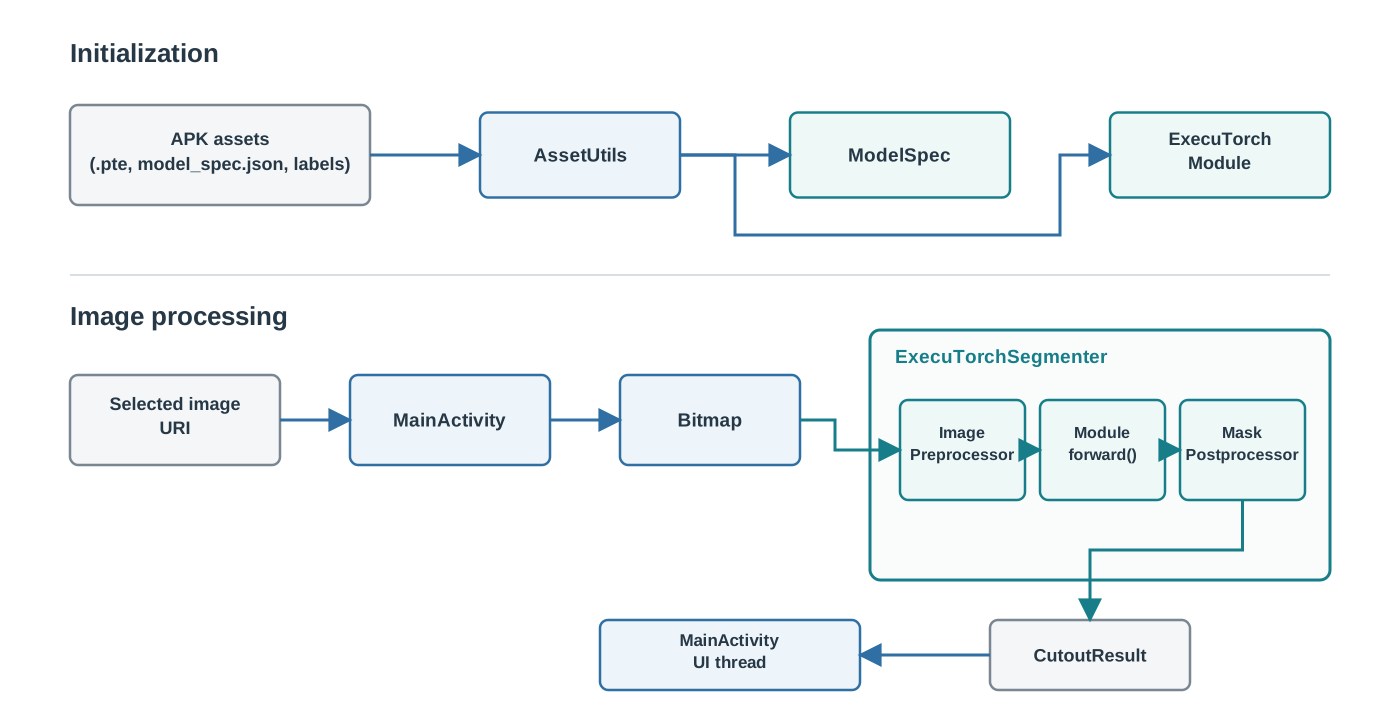
The model pipeline remains outside MainActivity, separating inference code from Android UI and lifecycle code.
The following pages will walk through the code, and how it achieves these steps:
- load the packaged
.pteprogram - decode the selected image into a
Bitmap - letterbox and normalize the image into an NCHW (batch, channels, height, width) float array
- create an ExecuTorch
Tensorand callModule.forward() - convert the logits into an alpha mask and cutout
- return the result to the UI thread and release the module with the Activity
Course complete
Nice work
You completed Optimize and deploy AI inference with ExecuTorch on Arm.